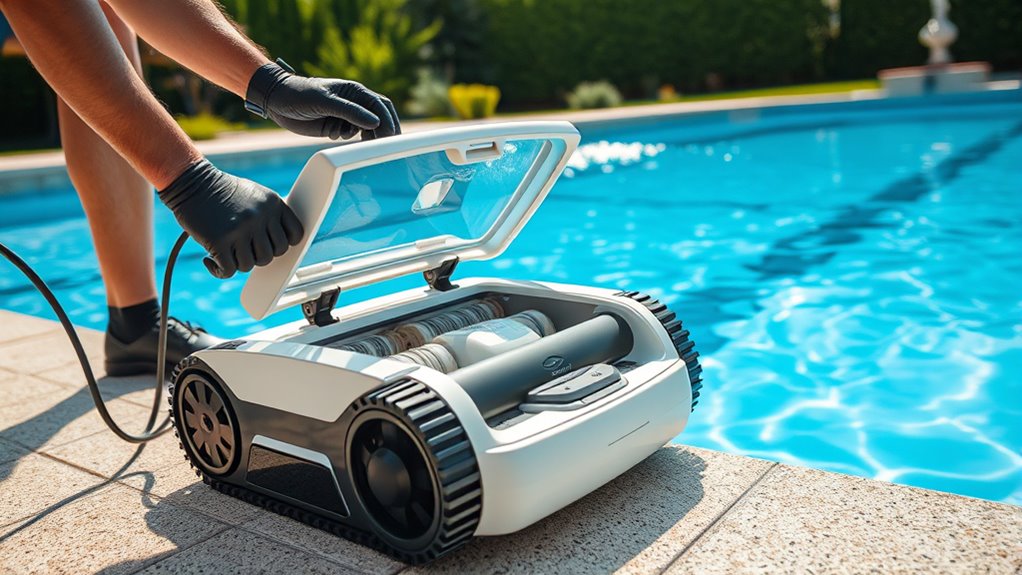

You should service your robotic pool cleaner regularly, ideally after every few uses or when you notice reduced performance. Turn off the device before opening it, then remove and rinse the filter with a hose to clear debris. Check the battery’s health periodically and replace it if you notice shorter cycles or mid-cycle shutdowns. Proper maintenance keeps your cleaner working efficiently and prolongs its lifespan—continue to explore how to keep everything in top shape.

Get the little things that make your day delivered free — and shop member deals
- Fast, free delivery on millions of items
- Access to Prime Big Deal Days deals on October 6–7
- Prime Video, Amazon Music and more included
Key Takeaways
- Regularly inspect and clean the filter after a few uses, especially with debris-heavy pools, to maintain optimal suction.
- Turn off the device before removing the filter compartment, rinse thoroughly, and gently scrub with a soft brush as needed.
- Check the battery health periodically; replace it when performance declines, following manufacturer guidelines for safe replacement.
- Access the battery compartment, disconnect the old battery carefully, and install the new one correctly to ensure proper operation.
- Follow the manufacturer’s maintenance schedule, store batteries properly, and replace filters or batteries promptly to extend device lifespan.

Maintaining a clean pool can be time-consuming, but a robotic pool cleaner service makes it effortless. Still, even the best devices need occasional servicing to keep them running smoothly. Knowing when and how to service your robotic cleaner ensures it works efficiently and lasts longer. Two critical aspects of maintenance are filter maintenance and battery replacement. Addressing these properly can prevent future issues and keep your pool sparkling.
Start by inspecting the filter regularly. The filter is the device’s primary line of defense against debris, dirt, and algae. Over time, it gets clogged, reducing suction power and cleaning effectiveness. You should check the filter after every few uses, especially if your pool has a lot of debris. To perform filter maintenance, turn off the robotic cleaner and remove the filter compartment as per the manufacturer’s instructions. Rinse the filter thoroughly with a hose to remove dirt and debris. For stubborn grime, gently scrub with a soft brush. Avoid using harsh chemicals, as they can damage the filter material. Regular cleaning of the filter ensures maximum suction and prolongs the life of your device. If the filter shows signs of damage or excessive wear, it’s time to replace it. Most models have replaceable filters, and doing so ensures your robotic cleaner maintains peak performance. Additionally, selecting the right filter can significantly impact cleaning efficiency and device longevity. Furthermore, keeping the filter free of buildup helps reduce oxidative stress on the motor and other components, which can contribute to component degradation and decrease the lifespan of your cleaner. Regular filter maintenance is also aligned with proper device longevity practices to maximize your investment.
Battery replacement is another essential service that shouldn’t be overlooked. The battery powers your robot, and over time, its capacity diminishes. If your cleaner isn’t holding a charge as long as it used to, or if it stops working midway through a cleaning cycle, it might be time for a new battery. Before replacing the battery, consult your user manual for specific instructions and safety precautions. Usually, replacing the battery involves removing the cover or compartment, disconnecting the old battery carefully, and installing the new one in the correct orientation. Make sure to use only compatible batteries recommended by the manufacturer to avoid damaging the device or voiding the warranty. Proper battery maintenance can extend its lifespan, but eventually, replacement becomes necessary. Keep in mind, some models may have replaceable batteries, while others might require professional servicing. Regularly checking battery health can help you plan for timely replacements and avoid unexpected malfunctions. Additionally, storing the battery properly when not in use can help maintain its performance over time. Recognizing signs of battery fatigue early can prevent complete device failure and the need for costly repairs.
Frequently Asked Questions
Can I Service My Robotic Pool Cleaner Myself?
Yes, you can do DIY maintenance on your robotic pool cleaner, but some tasks may require professional servicing. Regularly clean the brushes and filters to keep it running smoothly. If you notice persistent issues or complex repairs, it’s best to seek professional help. Doing routine upkeep yourself saves money and keeps your cleaner in top shape, but don’t hesitate to get expert assistance for more intricate problems.
How Often Should I Replace the Brushes or Filters?
You might wonder how often to do brush replacement or filter maintenance on your robotic pool cleaner. Typically, brushes need replacing every 6 to 12 months, depending on usage and water conditions, while filters should be cleaned weekly and replaced every season. Keep an eye out for worn brushes or clogged filters—they signal it’s time for maintenance. Stay proactive, and your cleaner will keep your pool sparkling all season long.
What Signs Indicate My Cleaner Needs Professional Repair?
If your robotic pool cleaner isn’t functioning properly, it’s time for a professional repair. Look for signs like unusual noises, poor cleaning performance, or error messages. Use a maintenance checklist and troubleshooting tips to identify issues early. If basic fixes don’t work, don’t hesitate to seek expert help to prevent further damage and guarantee your cleaner works efficiently again. Regular maintenance can also help avoid costly repairs.
Is It Safe to Service My Robotic Cleaner During Pool Operation?
Imagine you’re inspecting your robotic cleaner mid-pool session. It’s tempting to tinker, but pool safety and electrical hazards are real concerns. During operation, servicing can expose you to electric shock or damage the device. To stay safe, always turn off the power and disconnect the cleaner before servicing. Never work on it while active—your safety and your pool’s equipment depend on proper procedures.
How Long Does a Typical Robotic Pool Cleaner Service Take?
A typical robotic pool cleaner service takes about 30 to 60 minutes, depending on its condition. You’ll want to follow a maintenance checklist, including cleaning filters and removing debris. Troubleshooting tips can help identify issues quickly, saving time. Regular servicing keeps your cleaner running smoothly and extends its lifespan. Make sure to unplug it before starting, and inspect for any damage or worn parts during the process.
Conclusion
Regularly servicing your robotic pool cleaner keeps it running smoothly, keeps your pool sparkling, and prolongs the device’s life. By cleaning the filter, checking for wear, and following the manufacturer’s instructions, you guarantee it performs at its best. Think of your cleaner as a trusted partner—when you care for it, it cares for your pool. So, stay attentive, stay consistent, and enjoy a crystal-clear pool all season long.
Halloween Picks
halloween
As an affiliate, we earn on qualifying purchases.