
For most makers, I’d start with the Bambu Lab P1S, a well-rounded enclosed printer that balances speed and versatility. The Bambu Lab P2S Combo stands out if you want multicolor printing in one setup, while the FLASHFORGE Adventurer 5M is a simpler alternative for quick, straightforward prints. Across these 3D printers, the main tradeoffs are enclosure and material flexibility, multicolor convenience, printer size, and how much setup or maintenance you’re willing to handle. A feature-rich model can save time, but it may add complexity and take up more room. Read on for the full breakdown and recommendations by buyer type.

Get the little things that make your day delivered free with Prime
- Fast, free delivery on millions of items
- Prime Video, Amazon Music and more included
- Member-only deals all year
Complete the kit


Key Takeaways
- The P1S is the strongest all-rounder in this group: its enclosed design gives it broader material-use potential than the open A1 and A1 mini models.
- Multicolor printing comes with different kinds of overhead. Combo and multi-toolhead systems add color options, but they also bring more parts, workflow decisions, and potential filament waste than single-material printing.
- Fast CoreXY printers are not all interchangeable. The Adventurer 5M and AD5M focus on accessible speed, while enclosed options suit buyers who want more protection around the print area.
- Small-format and family-focused models solve different problems. The A1 mini favors a compact footprint; the AOSEED is aimed at guided, kid-oriented use rather than general-purpose maker flexibility.
- The right upgrade depends on your projects, not the biggest feature list. A tool-changing printer can suit frequent multicolor work, while a capable single-color printer may be easier to operate and maintain.
| Bambu Lab P1S 3D Printer |  | Best Overall | Model: P1S | Dimensions: 15.31 x 18.03 x 15.31 inches | Weight: 38.9 pounds | VIEW ON AMAZON | See Our Full Breakdown |
| Bambu Lab P2S Combo 3D Printer with AMS 2 Pro Multi-Color Printing |  | Best for Multicolor Printing | Print speed: Up to 600 mm/s | Extruder: PMSM servo extruder | Setup time: About 15 minutes | VIEW ON AMAZON | See Our Full Breakdown |
| FLASHFORGE Adventurer 5M 3D Printer |  | Best for Fast Prototyping | Print size: 220 x 220 x 220 mm | Maximum speed: 600 mm/s | Acceleration: 20,000 mm/s² | VIEW ON AMAZON | See Our Full Breakdown |
| Snapmaker U1 3D Printer with 4-Toolhead System and 5-Second Tool Changer |  | Best for Multimaterial Work | Toolheads: 4 | Tool change time: 5 seconds | Maximum print speed: 500 mm/s | VIEW ON AMAZON | See Our Full Breakdown |
| Creality K2 SE 3D Printer | 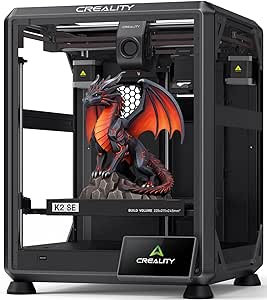 | Best for Quick Setup and Expansion | Maximum print speed: 500 mm/s | Acceleration: 20,000 mm/s² | Build volume: 220 x 215 x 245 mm | VIEW ON AMAZON | See Our Full Breakdown |
| Bambu Lab A1 mini 3D Printer + LED Lamp Kit |  | Best for Quiet, Beginner-Friendly Projects | Product dimensions: 15.21 × 16.77 × 17.94 inches | Item weight: 12.1 pounds | Noise level: ≤48 dB | VIEW ON AMAZON | See Our Full Breakdown |
| Flashforge Adventurer 5M Pro 3D Printer with 1-Click Auto Printing System |  | Best Enclosed Speed Pick | Build volume: 220 × 220 × 220 mm | Maximum print speed: 600 mm/s | Maximum nozzle temperature: 280 °C | VIEW ON AMAZON | See Our Full Breakdown |
| Bambu Lab P1S Combo 3D Printer with AMS – Multi-Color Printing |  | Best for Enclosed Multi-Color Printing | Maximum print speed: 500 mm/s | Acceleration: 20,000 mm/s² | Maximum colors or materials: Up to 16 with optional AMS | VIEW ON AMAZON | See Our Full Breakdown |
| Flashforge AD5M CoreXY 3D Printer |  | Best Practical CoreXY Value | Print technology: Fused deposition modeling (FDM) | Build volume: 220 × 220 × 220 mm | Maximum print speed: 600 mm/s | VIEW ON AMAZON | See Our Full Breakdown |
| Creality SPARKX i7 Nano Combo 3D Printer with CFS Nano Multi-Color System |  | Best for Larger Four-Color Prints | Build volume: 260 × 260 × 255 mm | Color capability: Up to 4 colors | Product dimensions: 18.5 × 16.65 × 17.95 inches | VIEW ON AMAZON | See Our Full Breakdown |
| FLASHFORGE Creator 5 Pro 4-Toolhead 3D Printer |  | Best for Low-Waste Multi-Material Printing | Toolheads: 4 independent | Maximum print speed: 600 mm/s | Motion system: CoreXY | VIEW ON AMAZON | See Our Full Breakdown |
| Flashforge AD5X Multi-Color CoreXY 3D Printer |  | Best Value Multi-Color CoreXY Pick | Build volume: 220 × 220 × 220 mm | Maximum print speed: 600 mm/s | Acceleration: 20,000 mm/s² | VIEW ON AMAZON | See Our Full Breakdown |
| Bambu Lab A1 FDM 3D Printer |  | Best for Beginner-Friendly Setup | Printing technology: FDM | Acceleration: Up to 10,000 mm/s² | Calibration: Automatic, including Z-offset and bed leveling | VIEW ON AMAZON | See Our Full Breakdown |
| FLASHFORGE Adventurer 5M High-Speed 3D Printer |  | Best Open-Frame Speed Pick | Build volume: 220 × 220 × 220 mm | Maximum print speed: 600 mm/s | Maximum acceleration: 20,000 mm/s² | VIEW ON AMAZON | See Our Full Breakdown |
| AOSEED AI 3D Printer for Kids, Fast 400mm/s, 12,000+ Models, Enclosed Safe |  | Best for Kids and Family Projects | Dimensions: 11.42 × 10.63 × 12.2 inches | Weight: 8.82 pounds | Print speed: 220–250 mm/s typical; up to 400 mm/s peak | VIEW ON AMAZON | See Our Full Breakdown |
More Details on Our Top Picks
Bambu Lab P1S 3D Printer
The Bambu Lab P1S is my most balanced pick for buyers who want fast, enclosed printing without having to build a multicolor setup into their first purchase. Its automatic bed leveling and 15-minute setup reduce the tuning and assembly work that can slow down a new printer owner, while the enclosure makes it more suitable than an open-frame machine for materials such as ABS and ASA. The Adventurer 5M reaches a higher listed top speed, but the P1S offers broader stated filament compatibility and a more all-around enclosed design. Its main catch is that multicolor printing requires a separately purchased AMS; the P2S Combo includes its AMS 2 Pro, so it is the more direct choice if color printing is a priority. I would also skip the P1S for carbon- or glass-fiber-reinforced polymers.
Pros:- Enclosed CoreXY design suits a wider range of materials than an open-frame printer.
- Automatic bed leveling reduces manual setup and first-layer adjustment.
- 15-minute assembly helps get from unboxing to printing quickly.
- High listed speed and acceleration support faster print jobs.
Cons:- AMS for multicolor printing is sold separately.
- Not recommended for carbon- or glass-fiber-reinforced polymers.
Best for: Home makers who want an enclosed, quick-to-set-up printer for everyday projects and a range of listed filament types.
Not ideal for: Buyers who want multicolor printing included, or who need to print carbon- or glass-fiber-reinforced polymers.
- Model:P1S
- Dimensions:15.31 x 18.03 x 15.31 inches
- Weight:38.9 pounds
- Maximum speed:500 mm/s
- Acceleration:20,000 mm/s²
- Supported filaments:PLA, PETG, TPU, PVA, PET, ABS, ASA, PA, PC
- Assembly time:15 minutes
Our verdict“Choose the P1S for a fast, enclosed all-rounder, but pick the P2S Combo if you want multicolor hardware in the box.”
Bambu Lab P2S Combo 3D Printer with AMS 2 Pro Multi-Color Printing
The Bambu Lab P2S Combo makes the strongest case for buyers who want multicolor or multimaterial printing ready from the start: this combo includes the AMS 2 Pro, rather than leaving that capability as a separate purchase as with the P1S. Its filament drying up to 65°C and adaptive airflow also give the bundled system a practical role beyond changing colors. The listed 600 mm/s speed exceeds the P1S’s 500 mm/s and matches the Adventurer 5M’s headline figure, while the P2S adds a PMSM servo extruder and AI failure detection. The tradeoff is that this recommendation applies specifically to the combo; the base P2S alone cannot print in multiple colors. Buyers who do not need the AMS features may prefer the P1S’s simpler proposition instead.
Pros:- AMS 2 Pro is included for multicolor and multimaterial printing.
- Filament drying up to 65°C can help manage moisture-sensitive filament.
- 600 mm/s listed print speed is higher than the P1S’s listed maximum.
- AI failure detection and automatic calibration reduce hands-on setup and monitoring.
Cons:- The base P2S does not provide multicolor printing; that capability requires this combo.
- Its extra system features may be unnecessary for buyers who only print single-color parts.
Best for: Makers who plan regular multicolor or multimaterial jobs and want filament drying bundled with the printer.
Not ideal for: Buyers who only print single-color parts or are considering the base P2S rather than the AMS 2 Pro combo.
- Print speed:Up to 600 mm/s
- Extruder:PMSM servo extruder
- Setup time:About 15 minutes
- Filament drying temperature:Up to 65°C
- Airflow system:Adaptive airflow with carbon filter
- Multicolor capability:Included via AMS 2 Pro in the combo version
Our verdict“Pick the P2S Combo if you will use the included AMS 2 Pro, otherwise the P1S is a simpler fit.”
FLASHFORGE Adventurer 5M 3D Printer
The FLASHFORGE Adventurer 5M is a speed-focused option for people who need to iterate quickly, rather than a bundled multicolor setup. Its 600 mm/s maximum speed, 20,000 mm/s² acceleration, 35-second warm-up and automatic bed leveling are geared toward reducing wait time between test parts. A 3-second nozzle change also makes it easier to switch nozzle sizes or replace a nozzle without a lengthy interruption. Like the P2S Combo, it lists a 600 mm/s maximum, but the P2S includes AMS 2 Pro for multicolor and multimaterial work; the 5M’s appeal is its rapid, comparatively direct workflow. Its 220 mm cubed print area is a defined limit, and its 280°C extruder does not by itself establish the same enclosed-material use case as the P1S.
Pros:- 600 mm/s listed speed and 20,000 mm/s² acceleration target fast iteration.
- Automatic bed leveling simplifies preparation for prints.
- Three-second nozzle changes reduce interruption when switching nozzles.
- Remote monitoring and control are available through the Flash Studio app.
Cons:- 220 x 220 x 220 mm build volume limits the size of parts.
- No multicolor system is included, unlike the P2S Combo.
- At 22 pounds, it is less convenient to move than a lighter desktop printer.
Best for: Designers, hobbyists and small workshops that value quick single-color prototypes and frequent nozzle changes.
Not ideal for: Buyers who need multicolor printing included, a larger build area, or an enclosed printer for their material needs.
- Print size:220 x 220 x 220 mm
- Maximum speed:600 mm/s
- Acceleration:20,000 mm/s²
- Extruder temperature:280°C
- Structure:CoreXY all-metal
- Nozzle change time:3 seconds
- Warm-up time:35 seconds
- Weight:22 pounds
Our verdict“Choose the Adventurer 5M for rapid prototyping and easy nozzle swaps, not for bundled multicolor printing or larger parts.”
Snapmaker U1 3D Printer with 4-Toolhead System and 5-Second Tool Changer
The Snapmaker U1 is the specialist pick for prints that need several materials, colors or support types in one job. Its four-toolhead system and five-second automatic tool changes give it a different approach from the P2S Combo’s AMS: separate toolheads can handle varied materials, including flexible TPU and soluble PVA, while the product description says the system reduces filament waste. The 270 mm cubed build volume also exceeds the Adventurer 5M’s 220 mm cubed area, giving larger projects more room. That flexibility comes with mechanical complexity. A four-toolhead system can mean more maintenance than a single-toolhead printer, and its listed 500 mm/s maximum is lower than the 600 mm/s figures of the P2S and Adventurer 5M. This is a capable fit for demanding workflows, not a simple speed-first choice.
Pros:- Four toolheads support multimaterial and multicolor jobs.
- Five-second tool changes help reduce the delays and material waste associated with tool changes.
- 270 x 270 x 270 mm build volume is larger than the Adventurer 5M’s.
- Listed material compatibility includes TPU, PVA, ABS, ASA, PA and PC.
Cons:- The four-toolhead mechanism may need more maintenance than a single-toolhead printer.
- Its 500 mm/s maximum is below the 600 mm/s listed for the P2S and Adventurer 5M.
- More system complexity may be unnecessary for routine single-material prints.
Best for: Makers producing parts that combine rigid, flexible or soluble-support materials, or need several colors in one print.
Not ideal for: Beginners seeking the simplest maintenance routine or buyers who primarily want the fastest single-material workflow.
- Toolheads:4
- Tool change time:5 seconds
- Maximum print speed:500 mm/s
- Build volume:270 x 270 x 270 mm
- Motion system:CoreXY
- Compatible materials:PLA, PVA, TPU, PETG, PCTG, ABS, ASA, PA, PC
- Warranty:1 year
Our verdict“Choose the U1 when multiple materials and reduced tool-change waste matter more than a simpler printer or a higher listed top speed.”
Creality K2 SE 3D Printer
The Creality K2 SE suits buyers who want a fast CoreXY printer with a short setup and the option to add multicolor capability later. Its five-minute assembly, automatic bed leveling and direct-drive extruder make it a straightforward starting point, while the die-cast aluminum frame and active vibration compensation are aimed at keeping prints steady at its listed 500 mm/s maximum. Compared with the P1S, the K2 SE is quicker to assemble but has a smaller stated material story: the P1S is enclosed and lists compatibility with a broader range of engineering filaments. The K2 SE can be expanded through Creality’s optional CFS system, but that is not included, unlike the AMS 2 Pro in the P2S Combo. Its 220 x 215 x 245 mm build volume also favors typical desktop parts over larger projects.
Pros:- Five-minute assembly and automatic bed leveling shorten initial setup.
- Die-cast aluminum alloy frame supports a rigid printer structure.
- Direct-drive extruder and quick-swap nozzles offer practical flexibility.
- Compatible with the optional Creality CFS for future multicolor expansion.
Cons:- Creality CFS is sold separately, unlike the AMS 2 Pro included with the P2S Combo.
- 220 x 215 x 245 mm build volume limits larger prints.
- The listed design is not enclosed like the P1S.
Best for: First-time owners who want a quick-to-assemble CoreXY printer and may add Creality CFS multicolor capability later.
Not ideal for: Buyers who need an included multicolor system, a larger build area, or an enclosed design for their material choices.
- Maximum print speed:500 mm/s
- Acceleration:20,000 mm/s²
- Build volume:220 x 215 x 245 mm
- Frame material:Die-cast aluminum alloy
- Extruder:Direct drive
- Motion system:CoreXY
- Assembly time:5 minutes
- Multicolor support:Compatible with optional Creality CFS
Our verdict“Pick the K2 SE for fast setup and the option to expand later, but choose the P2S Combo if multicolor printing must be ready out of the box.”
Bambu Lab A1 mini 3D Printer + LED Lamp Kit
The Bambu Lab A1 mini is the most approachable pick here for someone who wants to start printing without making setup and calibration a project of their own. Full-auto calibration and active flow-rate compensation handle routine adjustments, while the stated ≤48 dB noise level makes it better suited to a shared home or studio than the larger, more speed-focused Flashforge Adventurer 5M Pro. The included LED Lamp Kit also gives this bundle a clear first project: it pairs with MakerWorld models for decorative lights and gifts. The tradeoff is its compact format, which limits the size of objects you can print. Buyers focused on bigger parts or multi-color work should look instead at the Creality SPARKX i7 Nano Combo, though its setup takes more space.
Pros:- Full-auto calibration and flow-rate compensation reduce manual setup and tuning.
- Specified noise level of ≤48 dB suits shared home or studio spaces.
- Included LED Lamp Kit provides an immediate project beyond standard test prints.
- MakerWorld integration and the Bambu Handy app ecosystem offer access to models and mobile tools.
Cons:- Compact build format limits the size of printable objects.
- Less suited to buyers whose main priority is high-capacity or multi-color printing.
Best for: First-time home or studio users who want guided setup, quieter operation, and a ready-made lighting project.
Not ideal for: Makers printing large functional parts or prioritizing multi-color output; the compact printer is less suited to oversized projects, and the bundle’s standout lamp kit does not change that limit.
- Product dimensions:15.21 × 16.77 × 17.94 inches
- Item weight:12.1 pounds
- Noise level:≤48 dB
- Calibration:Full-auto calibration
- Flow control:Active Flow Rate Compensation
- Model library integration:MakerWorld
- Included accessory:LED Lamp Kit
- Model number:PF002-M-EU
Our verdict“Choose the A1 mini bundle for quiet, guided printing and lamp-making projects, but pick a larger model if your designs need more room.”
Flashforge Adventurer 5M Pro 3D Printer with 1-Click Auto Printing System
The Flashforge Adventurer 5M Pro is aimed at buyers who want fast CoreXY printing with the added containment of an enclosed machine. Its stated maximum speed of 600 mm/s, 220 × 220 × 220 mm build volume, and 280 °C nozzle give it a more production-minded profile than the compact Bambu Lab A1 mini. The enclosure, dual filtration, and built-in camera add practical benefits: the printer can sit in a shared workspace, and jobs can be monitored remotely through the Flash Studio app. Tool-free nozzle changes also make switching between the listed 0.25–0.8 mm sizes less of a chore. The tradeoff is a 22-pound, sizable unit; the Flashforge AD5M offers similar stated speed and volume, so this Pro version makes the most sense when enclosure and filtration matter.
Pros:- CoreXY system lists speeds up to 600 mm/s for buyers prioritizing fast production.
- Fully enclosed chamber and dual filtration suit more contained workspace use.
- Built-in camera and Flash Studio app support remote print monitoring.
- Tool-free quick-swap nozzle system accommodates 0.25–0.8 mm nozzle sizes.
Cons:- At 22 pounds and 16 × 14 × 18 inches, it needs a sturdy, dedicated spot.
- Its speed-focused setup may be more machine than occasional or simple-print users need.
Best for: Makers who want a fast, enclosed CoreXY printer with remote monitoring for a home workshop or shared workspace.
Not ideal for: Users with limited desk space or those who do not need an enclosure, filtration, or camera; its footprint and weight are harder to justify for basic printing.
- Build volume:220 × 220 × 220 mm
- Maximum print speed:600 mm/s
- Maximum nozzle temperature:280 °C
- Maximum heated bed temperature:110 °C
- Nozzle system:Tool-free quick-swap, 0.25–0.8 mm
- Enclosure and filtration:Enclosed chamber with dual filtration
- Monitoring:Built-in camera with Flash Studio app
- Noise level:<50 dB
- Product dimensions and weight:16 × 14 × 18 inches; 22 pounds
Our verdict“Pick the Adventurer 5M Pro if you want speed plus an enclosed, monitored workspace; choose a smaller or simpler printer if those extras will go unused.”
Bambu Lab P1S Combo 3D Printer with AMS – Multi-Color Printing
The Bambu Lab P1S Combo earns its place for buyers who want one enclosed printer to handle fast single-color jobs and more ambitious multi-color designs. It lists speeds up to 500 mm/s, automatic bed leveling, and a 15-minute setup, while its enclosure supports a broader filament mix than the open, beginner-oriented A1 mini. The differentiator is the AMS route to printing with up to 16 colors or materials; that gives it far more color capacity than the Creality SPARKX i7 Nano Combo’s four-color system. The catch is that the AMS is optional, so the multi-color advantage depends on adding that system. Material limits matter too: carbon- and glass-fiber-reinforced polymers are not recommended, and PA and PC are listed as capable rather than ideal choices.
Pros:- Optional AMS enables printing with up to 16 colors or materials.
- Enclosed design and automatic bed leveling support a capable, low-intervention workflow.
- Listed speed of 500 mm/s and acceleration of 20,000 mm/s² suit time-sensitive projects.
- Specified 15-minute setup helps shorten the path from unboxing to printing.
Cons:- AMS is optional, so multi-color capability is not available from the printer alone.
- Carbon- and glass-fiber-reinforced polymers are not recommended.
- PA and PC are listed as capable rather than ideal materials.
Best for: Makers who want an enclosed, fast printer and plan to add AMS for multi-color or multi-material projects.
Not ideal for: Buyers seeking multi-color printing without an additional AMS purchase, or users whose main materials are carbon- or glass-fiber-reinforced polymers.
- Maximum print speed:500 mm/s
- Acceleration:20,000 mm/s²
- Maximum colors or materials:Up to 16 with optional AMS
- Enclosed design:Yes
- Bed leveling:Automatic
- Setup time:15 minutes
- Ideal supported filaments:PLA, PETG, TPU, PVA, PET, ABS, ASA
- Other capable filaments:PA, PC
- Not recommended:Carbon- or glass-fiber-reinforced polymers
Our verdict“Choose the P1S Combo if you want enclosed high-speed printing with a path to 16-color work, but account for the optional AMS and material restrictions.”
Flashforge AD5M CoreXY 3D Printer
The Flashforge AD5M keeps the focus on useful CoreXY features rather than the enclosure and filtration package of the Adventurer 5M Pro. Both list a 600 mm/s maximum speed and a 220 × 220 × 220 mm build volume, but the AD5M’s strongest case is its one-click leveling, flexible PEI plate, and power-loss recovery. Those details address everyday friction: leveling is simplified, prints can be removed from the double-sided plate, and a power interruption need not automatically waste a long job. Quick-release nozzles in four diameters add flexibility for choosing detail or throughput. The main uncertainty is filament guidance: the supplied details specify PETG use on the reverse plate but do not lay out a broad material range. Compared with the enclosed Adventurer 5M Pro, this is the more straightforward option, but not the clearer choice for contained printing.
Pros:- CoreXY motion system lists a maximum print speed of 600 mm/s.
- One-click automatic leveling cuts down on manual bed adjustment.
- Double-sided flexible PEI steel plate makes print removal more convenient.
- Power-loss recovery and remote monitoring add useful safeguards for longer jobs.
Cons:- The supplied product details do not specify a broad range of supported filaments.
- No enclosed chamber or dual filtration is listed, unlike the Adventurer 5M Pro.
- At 22 pounds, it is not a lightweight desktop machine.
Best for: Makers who want a fast CoreXY printer with automatic leveling, flexible part removal, and recovery after power interruptions.
Not ideal for: Buyers who need a clearly specified range of compatible materials or want the enclosure and dual filtration listed for the Adventurer 5M Pro.
- Print technology:Fused deposition modeling (FDM)
- Build volume:220 × 220 × 220 mm
- Maximum print speed:600 mm/s
- Motion structure:All-metal CoreXY
- Bed leveling:Automatic, one-click
- Nozzle diameters:0.25, 0.4, 0.6, and 0.8 mm
- Nozzle swap:Tool-free; as little as 3 seconds
- Build plate:Double-sided flexible PEI steel plate
- Product dimensions and weight:15.83 × 14.29 × 17.64 inches; 22 pounds
Our verdict“Choose the AD5M for practical CoreXY features and power-loss recovery, but favor the Adventurer 5M Pro if enclosure and filtration are priorities.”
Creality SPARKX i7 Nano Combo 3D Printer with CFS Nano Multi-Color System
The Creality SPARKX i7 Nano Combo is the lineup’s fit for buyers who want automatic color changes without stepping up to the P1S Combo’s optional system for as many as 16 colors. Its included CFS Nano supports up to four filaments, while the 260 × 260 × 255 mm build volume gives projects more room than the 220 mm cube shared by the Flashforge AD5M and Adventurer 5M Pro. Auto-leveling, filament refill, feed and retract, and empty-run detection target long jobs that would otherwise need more hands-on attention. This is a pre-assembled machine, though its 21.4-pound weight means “compact” does not mean effortless to move. Four-color output is also a firm ceiling, so buyers planning elaborate palettes should look to the P1S Combo and its optional AMS instead.
Pros:- CFS Nano handles automatic filament switching for up to four colors.
- 260 × 260 × 255 mm build volume accommodates larger work than the 220 mm-cube Flashforge options.
- Auto filament refill and empty-run detection help manage longer prints.
- Pre-assembled design and auto-leveling reduce setup and routine intervention.
Cons:- Multi-color capability is limited to four colors, below the P1S Combo’s stated potential with AMS.
- At 21.4 pounds, it still requires a stable, planned placement.
- The 18.5-inch dimension means its footprint may not fit every compact desk.
Best for: Makers who want an included automatic multi-color system and a larger-than-220-mm build area for detailed or larger prints.
Not ideal for: Users who need more than four colors in one workflow, or anyone who needs a genuinely lightweight printer they can move often.
- Build volume:260 × 260 × 255 mm
- Color capability:Up to 4 colors
- Product dimensions:18.5 × 16.65 × 17.95 inches
- Item weight:21.4 pounds
- Assembly:Pre-assembled
- Bed leveling:Automatic
- Filament handling:Auto refill, feed, and retract
- Print monitoring feature:Empty-run detection
Our verdict“Choose the SPARKX i7 Nano Combo for a larger build area and included four-color printing, but look elsewhere if you need a wider color range or frequent portability.”
FLASHFORGE Creator 5 Pro 4-Toolhead 3D Printer
The Creator 5 Pro is the specialist pick here: its four independent toolheads and 7-second FlashSwap system are designed to reduce the purge waste that can accompany multi-color printing. That makes it a better fit than the Flashforge AD5X for frequent jobs that switch between materials or colors, while the AD5X is the more straightforward option for a typical four-color workflow. A heated chamber up to 65°C, enclosed frame, and CoreXY motion also make the Creator 5 Pro more suited to demanding materials such as ABS, PC, and PA than the open-frame Adventurer 5M. The tradeoff is size and specialization: at 39 pounds, it is a substantial machine, and its industrial capabilities may be unnecessary for casual PLA projects. I would choose it for complex production work, not as a first printer for occasional models.
Pros:- Four independent toolheads and a 7-second FlashSwap system reduce purge waste during multi-material printing.
- CoreXY motion supports speeds up to 600 mm/s.
- Heated chamber up to 65°C supports work with ABS, PC, and PA.
- Dual HEPA 13 and activated-carbon filtration accompany the enclosed design.
Cons:- At 39 pounds, it is heavier than the AD5X and Adventurer 5M.
- Its chamber and toolhead system may be excessive for simple, occasional prints.
- The supplied specifications do not state a build volume, making capacity comparisons harder.
Best for: Makers and small production teams printing frequent multi-material jobs who want to limit purge waste and need a heated chamber for advanced filaments.
Not ideal for: Casual hobbyists focused on occasional PLA prints, or buyers who need a lightweight printer that is easy to move.
- Toolheads:4 independent
- Maximum print speed:600 mm/s
- Motion system:CoreXY
- Maximum chamber temperature:65°C
- Filtration:Dual HEPA 13 and activated carbon
- Dimensions:16 × 14 × 18 inches
- Weight:39 pounds
Our verdict“Choose the Creator 5 Pro for low-waste, multi-material work and advanced filaments; skip it if you mainly print simple PLA parts.”
Flashforge AD5X Multi-Color CoreXY 3D Printer
The Flashforge AD5X brings four-color printing and a fast CoreXY platform together in a format aimed at everyday makers. Its 220 × 220 × 220 mm build volume suits common desk-size projects, while automatic leveling and filament handling cut down on setup between prints. Compared with the Creator 5 Pro, the AD5X is less specialized: it supports up to four colors, but the Creator’s independent toolheads and heated chamber are better aligned with frequent material changes and demanding filaments. The AD5X instead pairs color capability with practical conveniences such as power-loss recovery and remote monitoring. A 300°C direct-drive extruder broadens material options, though filament compatibility should not be inferred from nozzle temperature alone. Some nozzle sizes require an optional upgrade, so buyers planning specialized nozzle workflows should account for that limitation.
Pros:- Supports up to four colors in a 220 × 220 × 220 mm build volume.
- CoreXY motion reaches up to 600 mm/s with stated acceleration of 20,000 mm/s².
- Automatic bed leveling and filament handling simplify routine setup.
- Remote monitoring and print recovery add useful oversight and resilience.
Cons:- Some nozzle sizes require an optional upgrade.
- It lacks the Creator 5 Pro’s independent toolheads and heated chamber.
- The 600 mm/s maximum is a stated capability, not a guarantee that every print will run at that speed.
Best for: Home makers who want four-color prints, a standard-size build area, and automated setup without stepping up to a specialized independent-toolhead machine.
Not ideal for: Users who need a heated chamber for advanced materials or who want every listed nozzle size included without optional upgrades.
- Build volume:220 × 220 × 220 mm
- Maximum print speed:600 mm/s
- Acceleration:20,000 mm/s²
- Maximum extruder temperature:300°C
- Color capacity:Up to 4 colors
- Nozzle sizes:0.25 mm, 0.4 mm, 0.6 mm, 0.8 mm
- Weight:24.2 pounds
Our verdict“Pick the AD5X for accessible four-color CoreXY printing, but choose the Creator 5 Pro if low-waste tool changes and a heated chamber matter more.”
Bambu Lab A1 FDM 3D Printer
The Bambu Lab A1 is the uncomplicated choice for beginners who would rather start printing than spend time on manual calibration. Automatic Z-offset and bed leveling handle common setup tasks, while active flow rate compensation helps regulate extrusion as print conditions change. Its touchscreen and one-clip quick-swap nozzle also make basic operation and maintenance more approachable. Compared with the FLASHFORGE Adventurer 5M, the A1’s appeal is its calibration and extrusion assistance rather than a listed 600 mm/s top speed. It can reach acceleration up to 10,000 mm/s², but the product data does not provide a maximum print speed for a direct speed comparison. The main catch is color printing: the standalone A1 needs the separately sold AMS lite, or buyers can choose an A1 Combo. That adds a separate decision for anyone who wants multicolor output.
Pros:- Automatic calibration includes Z-offset and bed leveling.
- Active flow rate compensation supports more consistent extrusion.
- One-clip quick-swap nozzle simplifies nozzle changes.
- Touchscreen controls and active motor noise canceling add convenience.
Cons:- Multicolor printing requires an AMS lite, sold separately unless buying the A1 Combo.
- The supplied product data does not specify build volume or maximum print speed.
- Its stated acceleration is lower than the AD5X and Adventurer 5M figures.
Best for: First-time FDM printer owners who want automatic calibration, a touchscreen, and easier nozzle maintenance for single-color projects.
Not ideal for: Buyers who expect multicolor printing from the standalone machine or who prioritize a clearly stated high maximum print speed.
- Printing technology:FDM
- Acceleration:Up to 10,000 mm/s²
- Calibration:Automatic, including Z-offset and bed leveling
- Multi-color printing:Requires AMS lite, sold separately or with A1 Combo
- Nozzle:1-Clip quick-swap
- Noise reduction:Active motor noise canceling
- Controls:Touchscreen
Our verdict“Choose the A1 for an assisted, accessible start in single-color FDM printing, and budget for an AMS lite or Combo if you want multicolor.”
FLASHFORGE Adventurer 5M High-Speed 3D Printer
The Adventurer 5M favors fast, practical single-material printing over the enclosure and color systems found elsewhere in this group. Its CoreXY setup reaches a stated 600 mm/s, with automatic bed leveling and vibration compensation intended to help the first layer and reduce visible print artifacts. The 220 × 220 × 220 mm build volume matches the AD5X, but the AD5X adds up to four-color printing and remote monitoring; the 5M keeps its focus on straightforward output instead. A removable PEI plate, filament run-out sensing, and power-loss recovery are useful for everyday jobs. The open frame is the tradeoff: unlike the enclosed Creator 5 Pro, this model is aimed at PLA, PETG, and TPU rather than chamber-dependent advanced materials, and it is best placed in a well-ventilated space. Some filaments also call for specific nozzle sizes.
Pros:- CoreXY printing reaches a stated maximum speed of 600 mm/s.
- Automatic one-click bed leveling eases first-layer setup.
- Vibration compensation is designed to reduce print ghosting.
- Filament run-out sensing and power-loss recovery help protect longer jobs.
Cons:- Open-frame construction is less suited to materials that need a controlled heated chamber.
- Some supported filaments call for specific nozzle sizes.
- It does not offer the AD5X’s multi-color capability.
Best for: Makers who want a fast, open-frame printer for PLA, PETG, or TPU and value automatic leveling and print recovery.
Not ideal for: Users printing materials that benefit from an enclosed heated chamber, or households without a well-ventilated place for an open-frame machine.
- Build volume:220 × 220 × 220 mm
- Maximum print speed:600 mm/s
- Maximum acceleration:20,000 mm/s²
- Maximum nozzle temperature:280°C
- Nozzle flow:32 mm³/s
- Supported filaments:PLA, PETG, TPU, PLA-CF, PETG-CF
- Dimensions:14.29 × 15.83 × 17.64 inches
- Weight:23.8 pounds
Our verdict“Choose the Adventurer 5M for fast, single-material printing in a ventilated workspace, not for enclosed advanced-material or multicolor jobs.”
AOSEED AI 3D Printer for Kids, Fast 400mm/s, 12,000+ Models, Enclosed Safe
The AOSEED AI 3D Printer is built around getting children from an idea to a simple print with less direct setup from an adult. One-tap Wi-Fi app control and AI tools that accept voice, text, or image prompts offer a gentler starting point than the more conventional Bambu Lab A1, which emphasizes calibration and hands-on FDM controls. Its enclosed, pinch-resistant housing and included PLA kit also make it more family-oriented than the open-frame Adventurer 5M. The supplied information lists typical print speeds of 220–250 mm/s, with 400 mm/s as a peak, so I would not select it solely for speed. Its biggest limitation is clear: it supports only single-color PLA. That narrows its use for modelers seeking material variety, but keeps the intended learning and toy-making workflow focused.
Pros:- Voice, text, and image prompt tools give children several ways to begin a design.
- Enclosed, pinch-resistant housing is intended for a family setting.
- One-tap Wi-Fi app control and a built-in camera support remote operation and monitoring.
- Starter kit includes eight rolls of PLA.
Cons:- Supports single-color PLA only, limiting color and material choices.
- Typical stated print speed is 220–250 mm/s; 400 mm/s is a peak figure.
- Its family-focused app workflow offers less direct control than a conventional printer such as the Bambu Lab A1.
Best for: Families introducing children to 3D printing who want app-based creative tools, an enclosed design, and included PLA to start projects.
Not ideal for: Experienced makers who want multi-color printing, filament flexibility beyond PLA, or a printer optimized for larger technical projects.
- Dimensions:11.42 × 10.63 × 12.2 inches
- Weight:8.82 pounds
- Print speed:220–250 mm/s typical; up to 400 mm/s peak
- Layer resolution:0.05 mm
- Filament compatibility:PLA, single-color
- Included filament:8 rolls of PLA
- Design inputs:Voice, text, and image prompts
Our verdict“Choose the AOSEED for supervised family creativity and app-led projects, but pick the A1 or AD5X for broader maker control or multicolor printing.”

How We Picked
I compared these 15 3D printers around the decisions that affect day-to-day ownership: print speed and workflow, enclosure and build format, multicolor capability, setup and usability, and the likely effort involved in keeping each system working. I also considered how well each printer’s design fits its intended buyer, from compact home printing to family use and more involved multi-toolhead projects. Feature claims alone do not make a printer a better pick; their value depends on whether they solve a real need.
The ranking gives priority to versatility and a manageable ownership experience, which puts the P1S first as a balanced starting point. The P2S Combo and other multicolor systems move up for buyers who will use their added capabilities, but their extra hardware and workflow complexity keep them from being automatic choices for everyone. More focused models rank well for their specific audiences, while smaller or more specialized machines sit lower as general recommendations because they suit a narrower range of projects.
Factors to Consider When Choosing 3d Printers
Before choosing a printer, I’d match the machine to the work you expect to do repeatedly—not a one-off project or a headline feature. These factors help clarify where added capability pays off and where a simpler setup is the better fit.
Choose an enclosure around your materials and workspace
An enclosure can help manage drafts and keep the print area more contained, which matters when you want to experiment with materials that are more sensitive to temperature changes. It does not make every material easy to print, so check the printer’s supported materials and ventilation needs rather than treating an enclosure as a universal solution. Open-frame machines can be easier to access and may fit casual printing well, but they offer less separation between the print and the surrounding room. Think about where the printer will sit, especially in a shared living space. A common mistake is paying for an enclosure without having a plan for the materials that make use of it. Pick the form factor that suits your actual workspace and projects.
Treat multicolor as a workflow choice, not just a feature
Multicolor printing can reduce the need to paint models and make labels, decorative pieces, or complex prototypes easier to produce in one job. The mechanism matters: a filament-switching system and a printer with multiple toolheads handle color changes differently, so their setup and operating routines are not identical. More colors can also mean more filament handling, purge material, and time spent preparing a print. If you mostly make functional parts in one material, those costs may outweigh the visual benefits. Before buying, consider how often you’ll use color and whether the model designs you print can be made with fewer color changes. A single-color machine remains a sensible choice when reliability and simpler operation matter more than appearance.
Match build volume to the objects you actually print
A larger build area can fit bigger parts, but it also asks for more desk or floor space and can encourage unnecessary compromises in where the printer lives. A compact machine may be a better fit for miniatures, small household parts, and occasional projects, even if larger objects need to be split into sections. Check the usable build dimensions against the largest item you expect to print, including room for a brim or other print features when needed. Don’t assume that a bigger frame means every print will be faster; print geometry and settings still affect job time. Measure the intended location as well as the printer’s footprint, and leave room to access the machine. Choose extra capacity only when it expands the kinds of projects you plan to make.
Separate high-speed claims from practical print time
Advertised speed is only one part of how quickly a finished object reaches your desk. Print quality, layer height, model shape, material, and the time needed to prepare and remove a print all affect the full cycle. A fast motion system can be useful for repeated jobs, but buyers who print occasionally may gain more from a straightforward setup than from the highest stated speed. Look for how a printer supports calibration and routine adjustments, since a fast machine still needs suitable settings for the job. Compare the expected use pattern: short, frequent prints reward convenience, while a large detailed model may not benefit as much from peak speed. Avoid choosing a printer on its fastest mode alone.
Budget for the ownership workflow, not just the printer
Filament, build surfaces, spare nozzles, tools, and time for upkeep all shape what ownership feels like. Systems with more moving parts or multiple material paths can offer greater creative range, yet give you more components and processes to understand. A simpler printer may have fewer built-in options but leave more room in your budget for materials and useful upgrades. Check how calibration, cleaning, and part replacement are handled before deciding that automation will remove all maintenance. Beginners often benefit from a clear setup path and accessible support more than advanced features they may not use. The best fit is the one whose routine you can comfortably maintain.
Frequently Asked Questions
Should I buy an enclosed printer if I’m new to 3D printing?
Not automatically. An enclosure is most useful when your materials or workspace make a more contained print area valuable, but it does not replace learning basic slicing and material settings. If your first projects are small items made from common filament, a simpler open printer may be enough. Consider where the machine will operate and whether you need added separation from children or pets. Choose an enclosure for a clear material or workspace reason, not just because it sounds like a premium feature.
Is a multicolor printer worth it if I mostly print functional parts?
It depends on whether color is part of the function or just an occasional finishing preference. Multicolor can help with labels, visual prototypes, and parts that need clearly differentiated sections, but those jobs involve extra preparation and material handling. For many functional prints, one filament color is adequate, and a simpler printer can make routine production easier. You can also paint or assemble separate pieces when a project calls for multiple colors. I’d choose multicolor hardware when you expect to use it regularly, rather than for a small number of novelty prints.
How much build volume do I need for a home printer?
Start with the largest object you expect to print, then compare its dimensions with the machine’s usable build area. Many household parts, models, and hobby components fit within a modest footprint, while larger objects can sometimes be printed as separate pieces and assembled. Splitting a design adds planning and finishing work, but may be preferable to giving up desk space for a larger printer. Also leave room around the machine for access, filament changes, and routine care. Buying extra volume makes sense when large, single-piece prints are a recurring need.
Can a kid-focused printer replace a general-purpose 3D printer?
A kid-focused model can be a good match for guided projects and an approachable family workflow, but that does not mean it offers the same range as a general maker printer. Before choosing one, review its supported materials, software flow, safety features, and how much control an adult can retain over print setup. A general-purpose printer may suit a household that wants to make functional parts as well as toys or models. Family needs also include supervision, ventilation, and a stable location for the machine. Pick for the projects and level of adult involvement you expect, not the intended audience label alone.
When is it worth choosing a tool-changing printer over a filament-switching model?
A tool-changing design may appeal if you expect frequent jobs that need multiple materials or colors and value a workflow built around separate toolheads. A filament-switching system can be a more familiar route to multicolor output, but color changes may involve different handling and material use. Neither arrangement removes the need to prepare models and tune print settings. Compare how often you will use multiple materials, how much setup you are willing to do, and what kinds of projects you print. For mostly single-color work, either advanced system may add complexity without enough day-to-day benefit.
Conclusion
Best overall: I’d choose the Bambu Lab P1S for a balanced mix of enclosure and general-purpose capability. Best value-oriented pick: the FLASHFORGE Adventurer 5M suits buyers who want a straightforward high-speed machine without making multicolor the focus. Best premium option: the Bambu Lab P2S Combo is the stronger fit for makers who will use its multicolor workflow, while the Snapmaker U1 and FLASHFORGE Creator 5 Pro merit attention for buyers specifically interested in multiple toolheads. Best for beginners: the Adventurer 5M offers a less involved starting point than the more feature-heavy systems; the A1 mini is a good alternative when compact size matters most. Best for specific needs: I’d look at the AOSEED for a guided, kid-oriented setup and the A1 mini for limited space. Choose based on the projects you expect to make often: a more advanced printer pays off when its added capabilities become part of your routine.